



Abandoned Carts: How to Win Back Customers Who Left Without Buying


A customer picks a product, adds it to the cart, goes to the checkout form, and disappears. In the PrestaShop admin panel, all that’s left is a cart with no order. There are more of these carts than most store owners assume: according to Baymard Institute’s aggregate of studies, about 70% of carts are abandoned on average.
You can’t win them all back, and you don’t need to. Some people are just checking the price or comparing offers. But you can win back the ones who were stopped by a specific problem. In this article, we go step by step through diagnosis, fixes in your store, reminders, and how to measure the results.
In short: cart recovery starts with removing the causes; emails come later. First, check which step customers drop off at, fix the cart and the form, and then add reminders and retargeting. Save discounts for last.
What is an abandoned cart, and how do you measure the scale?
An abandoned cart is when a customer added a product but didn’t place an order. The abandonment rate is easy to calculate: the number of carts without an order divided by the number of all carts started. If 1,000 carts were created in a month and there were 300 orders, 70% were abandoned.
The number on its own doesn’t tell you much, though. The funnel in Google Analytics 4 will tell you a lot more: how many people add to cart, how many start checkout, and how many reach payment. A big drop at shipping is a different problem than a drop on the payment screen. Also check mobile and desktop separately, because abandonment is usually higher on phones.
In PrestaShop itself, you’ll find carts under Orders, in the Shopping Carts section. It’s worth going through them manually at least once. The same product showing up again and again in abandoned carts often points to a problem with its price, shipping, or description.
Why do customers abandon their purchase?
Baymard regularly asks shoppers about this. At the top of its list of reasons are extra costs that show up at the very end. Also high on the list: delivery that takes too long, lack of trust in the store, and being forced to create an account. The diagram below sums up the most common causes and the first response to each.
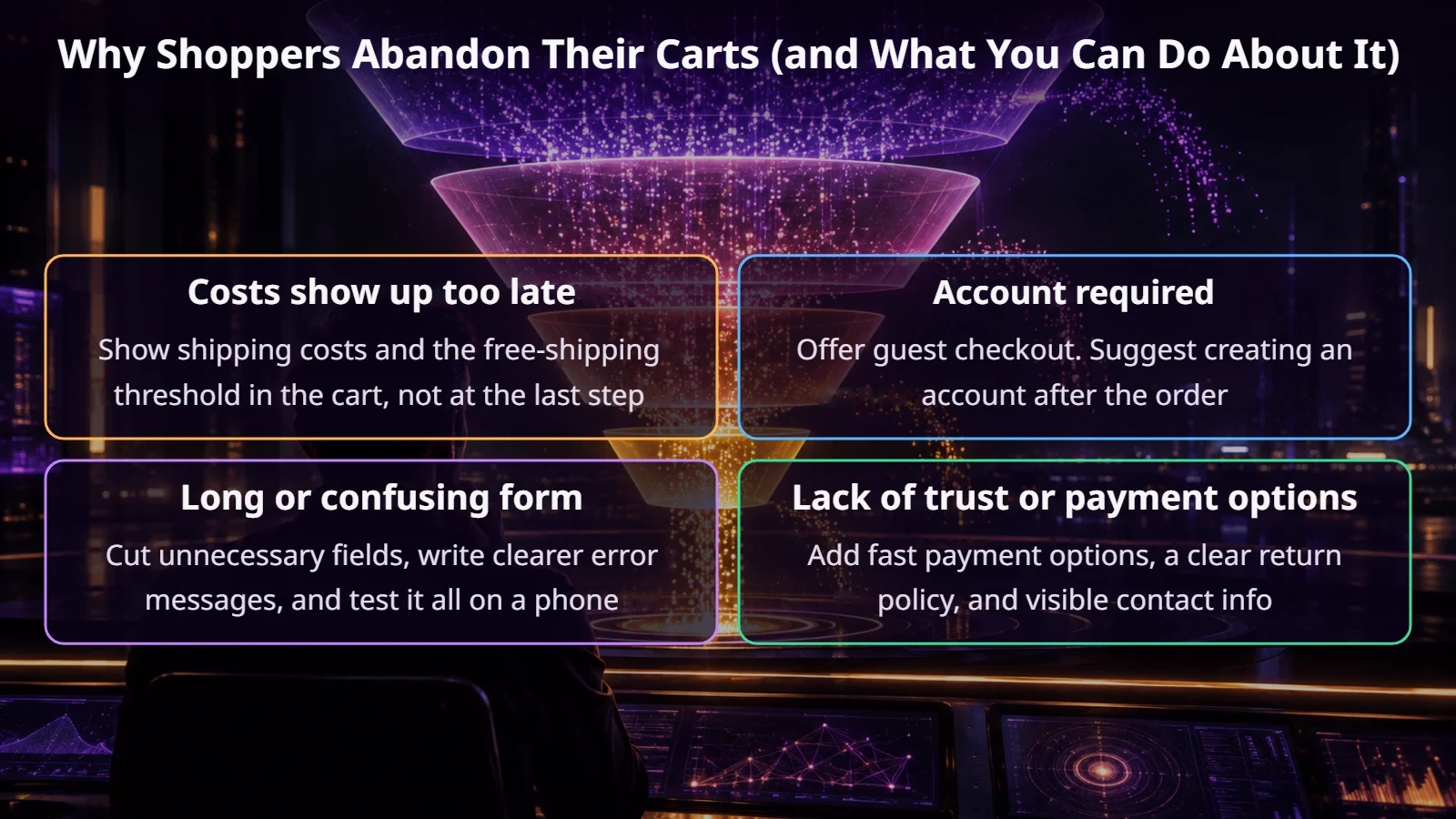
Notice that none of these fixes is an email. A reminder won’t fix a shipping cost that surprises customers every single time. That’s why we make the fixes in the store first.
The first line of defense: the cart and checkout themselves
This is usually where you’ll get the cheapest wins, because a fix works for every customer, not just the ones a reminder reaches.
A one-page checkout is often a good step. We cover it separately in our article on PrestaShop OPC. In stores with lots of mobile orders, this change is usually the first thing we discuss.
Email reminders: how to plan them
An abandoned cart email works because it reaches someone who wanted to buy just moments ago. For the store to send it, it needs the customer’s address, which means the customer has to be logged in or enter it in the form. A standard PrestaShop installation isn’t enough for this to run smoothly, so you’ll need a module or a marketing automation tool.
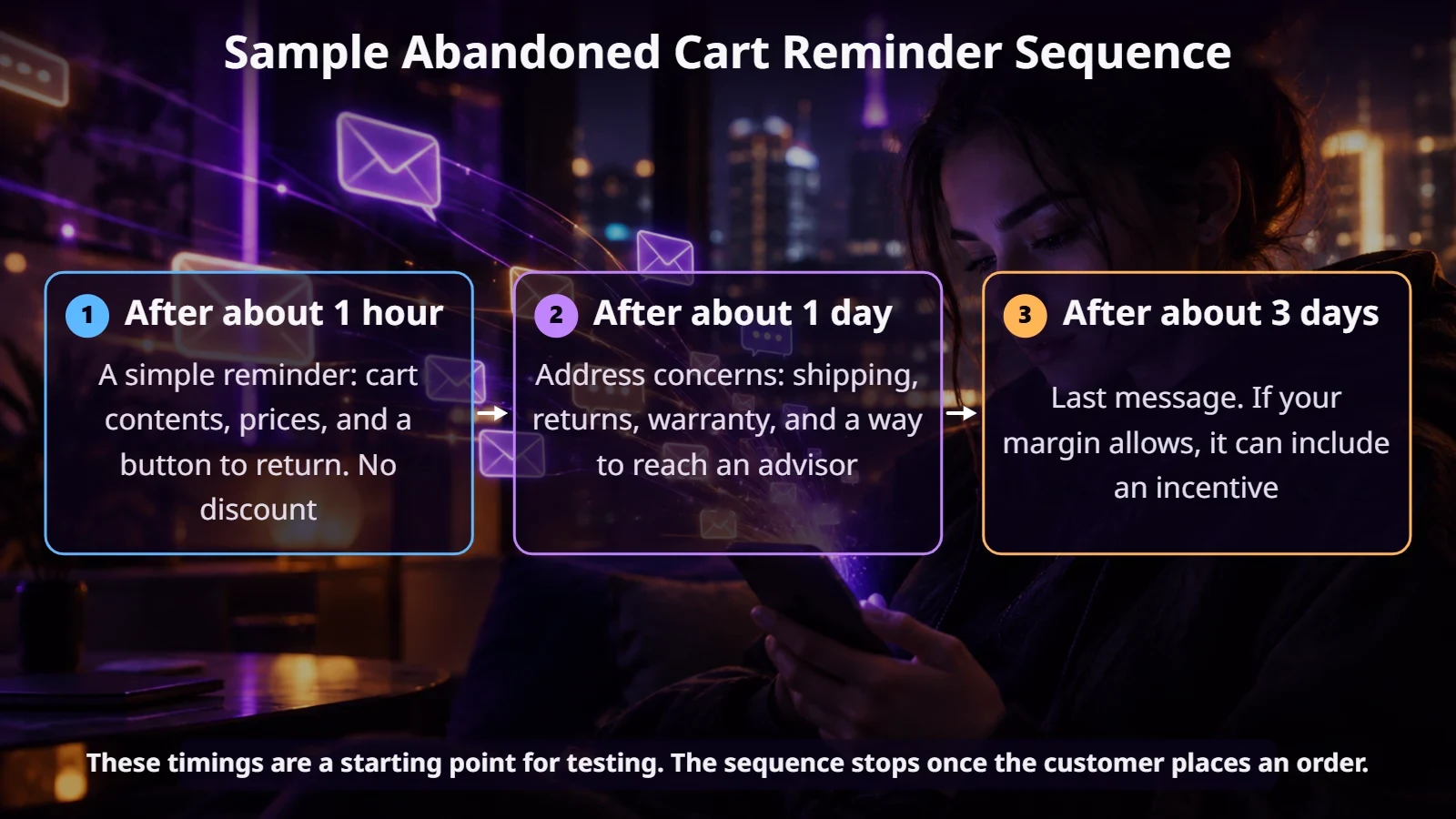
The first message should remind, not sell. Show product images, the price, and a button that leads back to the same cart. The second addresses concerns, and the third can include an incentive. Write the subject line naturally, the way you’d write to a customer, not to a mailing list.
One important note: a cart reminder may be considered marketing communication and require proper consent. It’s worth agreeing on the sending rules with a lawyer before you launch the sequence.
The prestaninja.pl team
Other channels: SMS, push notifications, retargeting, and a phone call
Does an abandoned cart mean the same thing in B2B?
Not quite. A business customer often leaves a cart because they’re waiting for a manager’s approval, want to discuss the price, or are collecting items over several days. An automatic email with a discount code makes no sense here.
What works better is a heads-up for the account manager: the customer has goods worth a certain amount in their cart and hasn’t placed an order. The sales rep then calls with something specific to offer. If price is the issue, a good solution can be a price negotiator, which we describe in a separate article.
What does it get you, and how do you measure the results?
We won’t promise a single number, because results depend on your industry, cart value, and how good your checkout was to begin with. What counts is your own data. Compare it over a longer period and account for seasonality.
If possible, keep a control group that doesn’t get reminders. Only then will you see how many people would have come back to their cart without any email.
When isn’t it worth the effort?
Advanced automation doesn’t make sense if you get a few orders a week or the problem lies earlier, for example in low traffic. In that case, the cost of the tool and the setup time won’t pay off quickly. The same goes for a store with bugs in checkout. Fix those first.
Summary
You won’t eliminate abandoned carts, but you can win back some of them in this order: diagnosis, cart fixes, reminders, and other channels. That order also ensures you’re not paying for emails that just paper over a problem in your store.
If you want to find out where your PrestaShop store is losing customers, get in touch. We’ll review your funnel and checkout, then tell you where to start.
FAQ
What’s a normal cart abandonment rate?
Baymard puts the average at around 70%, but it varies by industry and device. More important than comparisons is whether your rate goes down after the changes you make.
Does PrestaShop send abandoned cart emails on its own?
Carts are saved in the admin panel, but for convenient reminder sequences you need a module or an external tool.
Do I need to offer a discount in the reminder?
No. The first messages should work without a discount. Save the incentive for the last message and check whether it pays off at your margin.
Can I send a reminder to everyone who left their email address?
That depends on the consents you have and the nature of the message. It’s worth confirming the rules with a lawyer before you turn on the automation.