



B2B Wishlists: How to Build Curated Buying Lists for Your Trade Partners


A sales rep sends a partner a PDF of new arrivals. The partner skims it on the go, marks a few items, and replies by email. Then someone checks prices and stock, and in the end re-types everything into an order anyway. A week later, nobody remembers which products the partner found interesting.
The same work can be done by a seemingly ordinary feature: the wishlist. In a B2B store, it stops being a place to stash products and becomes a sales tool. In this article, we describe how to design it and what you can gain from it.
In short: in B2B, a wishlist can serve as a shared workspace for the customer and their account manager. The sales rep picks the products, the partner sees them with their own prices and current availability, and adds the whole list to the cart with one click. There’s one condition: the list has to be connected to the cart, the partner’s account, and reporting.
How is a B2B wishlist different from one in a retail store?
A retail customer saves a product to come back to it later. A trade partner uses lists differently: for regular purchasing, preparing offers for their own customers, and ordering for the season or for different locations. And often, more than one person works on the same list.
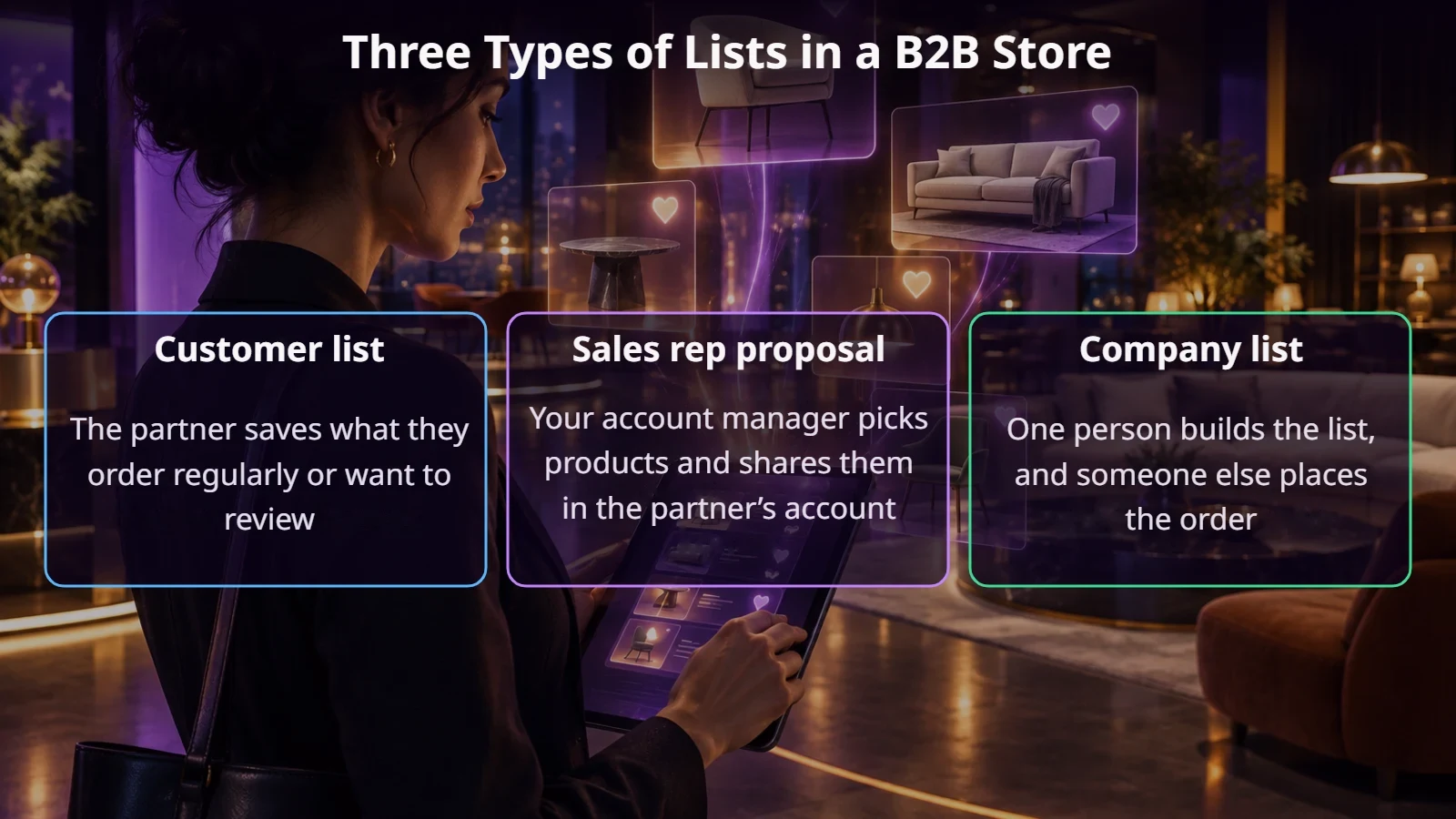
PrestaShop’s standard wishlist module is enough to get started, but it usually covers only the customer’s basic needs. In B2B, the three types of lists shown below come in handy.
How do you build a buying proposal for a partner?
The most interesting case is the middle one: a list prepared by the sales rep. It’s essentially a lightweight quote inside the store, always up to date, because prices and stock come from the system. The flow might look like this:
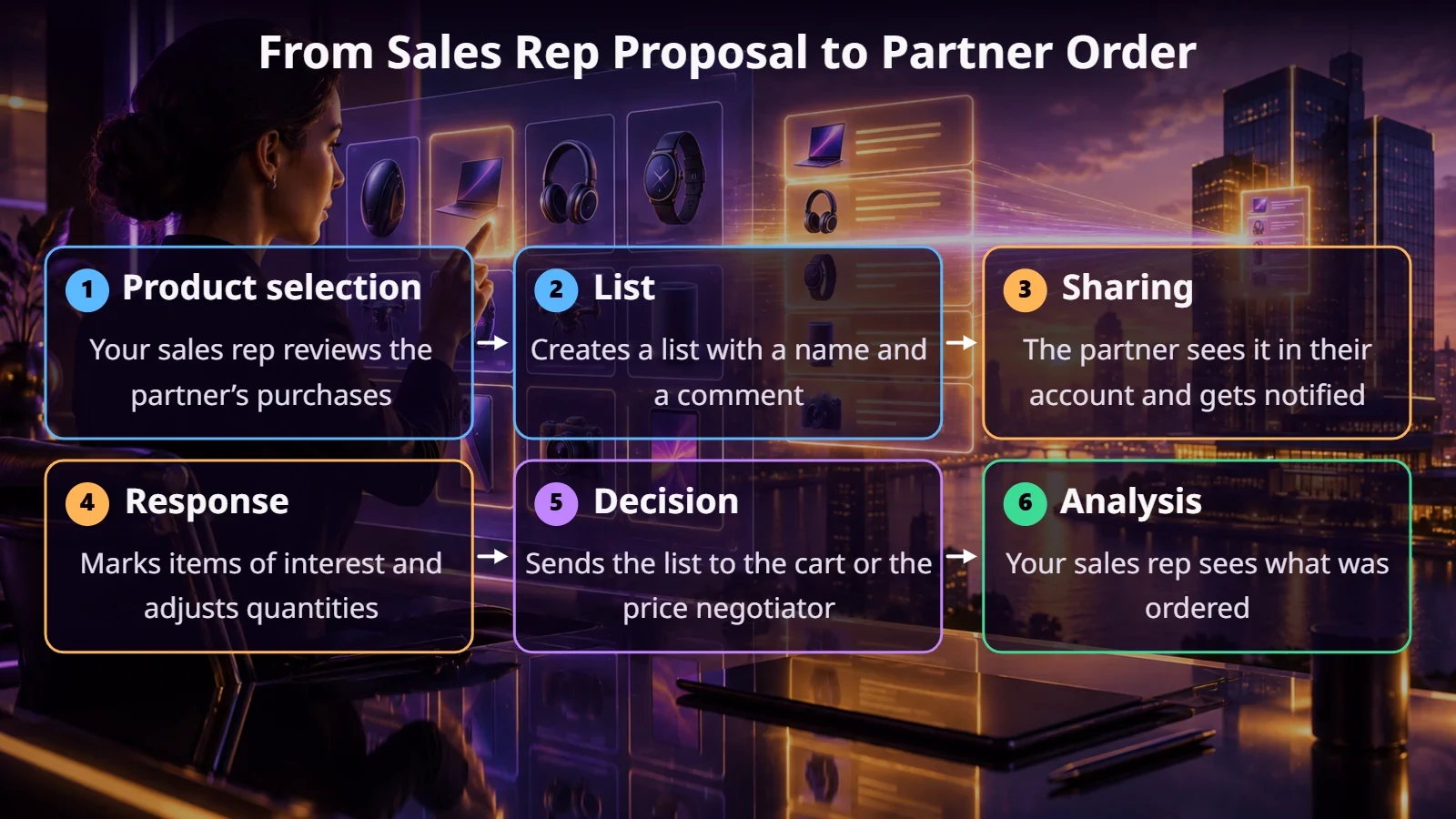
Where should the products for such a list come from? Ideally from data: what the partner bought a year ago, what they haven’t reordered lately, what similar customers buy, and what’s new in their categories. The sales rep’s comment, such as “this model sells well in your region,” is often more valuable than the list itself.
Which features do you actually need?
An example from our Furnitex project: in the customer account, we planned a wishlist view, the products within each list, and list sharing. In a model with goods in transit, it’s especially important to show whether a product is in the local warehouse or only available on a specific date.
The prestaninja.pl team
What does a wishlist tell your sales team?
Every list is a signal. If a partner has had 200 units sitting there for a month without ordering, maybe they’re waiting for a better price or a delivery. That’s a good reason to call. The sales rep isn’t calling “just to check in,” but with a specific offer.
Data from many lists also helps your purchasing team. Products that are often added but rarely bought may have a problem with price, availability, or the description. Just make sure you check how you collect and use this information, especially with regard to your terms and the personal data of contact persons.
Lists also pair well with a price negotiator. A partner can submit a ready-made list for a price discussion instead of creating a new request from scratch.
What to watch out for during implementation
When is it not a good idea?
If partners buy a handful of the same products and order via a file or the ERP, advanced lists won’t change much. Quick ordering by SKU or reordering will serve them better. The same applies if your company doesn’t have sales reps actively managing customers. In that case, start with simple customer lists and see whether anyone uses them.
Summary
A well-designed B2B wishlist shortens the path from idea to order. Sales reps don’t have to create PDFs, partners see up-to-date data, and your business learns what really interests your customers. Start with a few lists and one sales team, and add the rest based on how people actually use them.
If you want to put lists to work in your B2B store, get in touch. We’ll look at how you prepare offers for partners today and suggest the simplest first step.
FAQ
Does PrestaShop have a wishlist out of the box?
Yes, there’s a wishlist module. In newer versions, it lets you create multiple lists and share them via a link. In B2B, it usually needs to be extended, for example with a sales rep dashboard, comments, and reports.
How is a list different from a cart?
A cart is for buying here and now. A list sticks around longer, you can have many of them, and they can be prepared together.
Can a sales rep create lists on behalf of a customer?
Yes, if the system supports it. It’s worth recording who created the list and when the customer viewed it.
How do you measure the results?
Check how many lists lead to orders, what they’re worth, and which products stay on the list without being bought.